사용자의 api키를 이용하기 전까지는 라우트 핸들러의 중요성을 몰랐지만 이번 RIOT API KEY를 사용하며 라우트 핸들러를 왜 사용해야 하는지 언제 사용해야 하는지 감이 딱 와서 바로 블로그로 정리해보겠습니다~~~!!!
강의 들을 때는 와닿지 않았지만 역시 경험해보니 바로 알게 되는.....

소소한 팁
NEXT_PUBLIC_이라는 접두사가 붙은 환경 변수는 클라이언트에서 접근 가능
붙지 않을 경우 서버에서 접근 가능
🎯 문제 상황: 내 API KEY가 네트워크 창에 그대로 노출....?
"use client";

import { useQuery } from "@tanstack/react-query";
import React from "react";

const getChampionRotation = async () => {
  const res = await fetch(
    "https://kr.api.riotgames.com/lol/platform/v3/champion-rotations",
    {
      method: "GET",
      headers: {
        "X-Riot-Token": process.env.NEXT_PUBLIC_RIOT_API_KEY || "",
      },
    }
  );
  return res.json();
};

const RotationPage = () => {
  const { data } = useQuery({
    queryKey: ["rotation"],
    queryFn: getChampionRotation,
  });

  return <div>RotationPage</div>;
};

export default RotationPage;
클라이언트 측에서 저의 API KEY를 넣어 통신을 해보겠습니다.
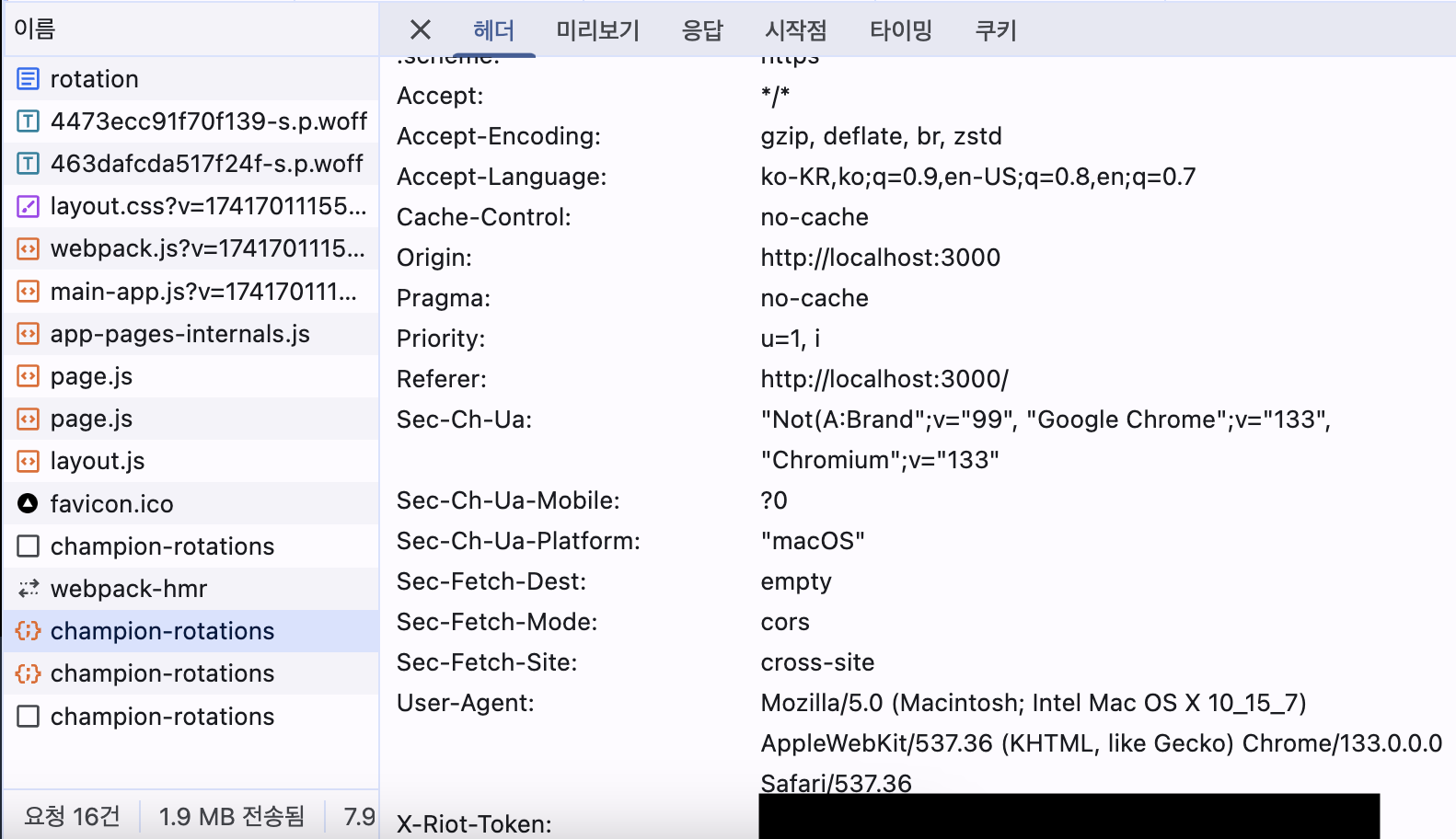
개발자 도구에서 요청 헤더를 살펴보니 저의 API KEY가 그대로 노출되는 문제가 발생했습니다.
자... 여기서 라우트 핸들러의 필요성이 생기게 됩니다.
✅ 라우트 핸들러를 사용하여 API 키 보호
// app/api/rotation/route.ts

import { NextResponse } from "next/server";

export async function GET() {
  try {
    const res = await fetch(
      "https://kr.api.riotgames.com/lol/platform/v3/champion-rotations",
      {
        method: "GET",
        headers: {
          "X-Riot-Token": process.env.RIOT_API_KEY || "",
        },
      }
    );

    if (!res.ok) {
      return NextResponse.json(
        { error: "챔피언 로테이션을 받아오는데 실패하였습니다." },
        { status: res.status }
      );
    }

    const data = await res.json();
    return NextResponse.json(data);
  } catch (error) {
    return NextResponse.json(
      { error: "Internal Server Error" },
      { status: 500 }
    );
  }
}
이렇게 라우트 핸들러를 이용하여 API KEY를 요청 헤더에 포함시킨 후 응답을 받는 로직을 구현합니다.
이는 서버 단에서 요청을 보내는 것이기 때문에 클라이언트에서 노출될 일이 없습니다.
그렇다면 클라이언트 측에서는 이 데이터를 어떻게 받아올까요?
"use client";

import { useQuery } from "@tanstack/react-query";
import React from "react";

const getChampionRotation = async () => {
  const res = await fetch("/api/rotation");
  return res.json();
};

const RotationPage = () => {
  const { data } = useQuery({
    queryKey: ["rotation"],
    queryFn: getChampionRotation,
  });

  return <div>RotationPage</div>;
};

export default RotationPage;
/api/rotation 👈 서버의 라우트 핸들러를 호출하여 데이터를 받아옵니다.
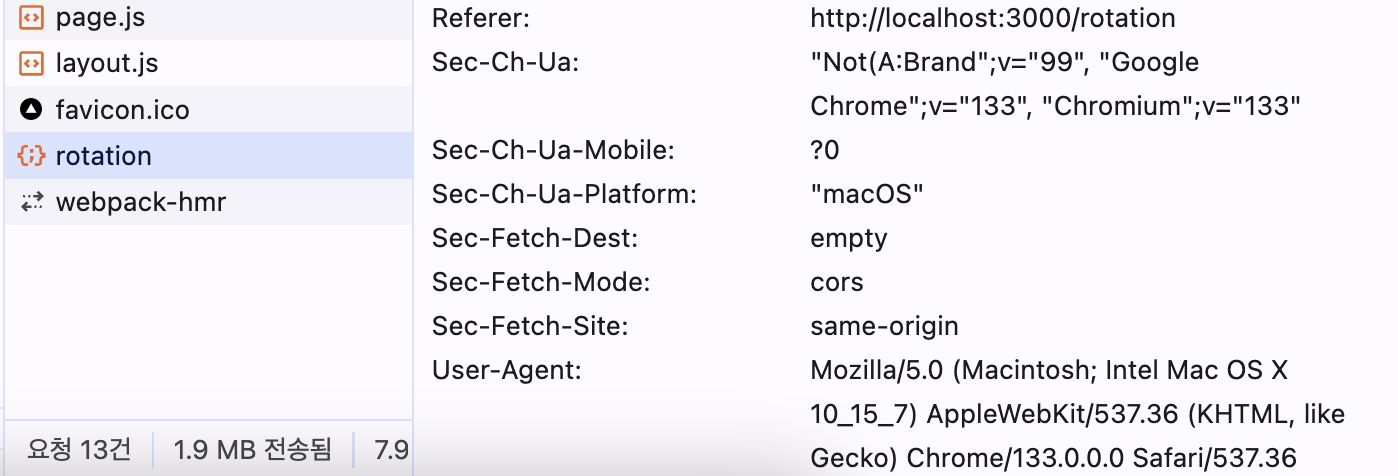
이렇게 요청 헤더에 API KEY가 노출되지 않는 것을 볼 수 있습니다.